Trustap API Docs with AI

By
2 min read
Share

The way we consume documentation is undergoing a massive shift. For years, the standard workflow for a Product Manager or Engineer was: Search → Scan → Click → Read → Trial and Error. But in the age of Large Language Models (LLMs), the goal has shifted from “finding the right page” to “getting the right answer.” At Trustap, we’ve updated our API documentation to be more than just a manual—it’s now a high-speed data source for AI tools.

Here is how you can leverage our new AI-native features to integrate Trustap faster than ever.

1. The “Ask AI” Search: Your In-Docs Consultant

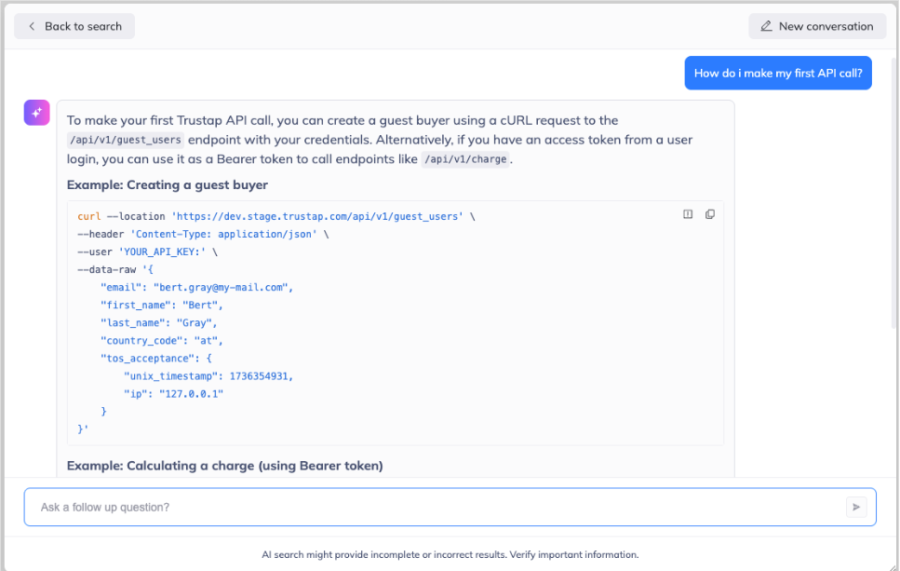
Instead of traditional keyword matching, our documentation now features a built-in Ask AI button. This isn’t just a wrapper for a general chatbot; it’s a specialized tool designed to solve the “hallucination” problem.

  • Doc-Specific Intelligence: The AI generates answers derived only from the Trustap documentation. It won’t guess based on the open internet; if it isn’t in our docs, it won’t make it up.
  • Inference-Only Mode: Your queries are processed to provide answers, but they aren’t used to “train” the underlying model. Your specific implementation ideas stay private.


2. Copy for LLMs: Formatting for Machine Logic

Humans like beautiful UI, sidebars, and nested menus. AI models prefer clean, structured text. On every page of our docs, you’ll find a Copy button that bridges this gap.

When you click it, you’re given options tailored for your workflow:

  • Copy for LLM: Strips away the formatting and provides a text only version of the page.
  • View as Markdown: Provides a view of the page in markdown making it easy for you to extract sections of content.
  • Open in ChatGPT / Claude: One-click shortcuts that open a new session with the relevant Trustap context already loaded.

3. LLMS.txt: The “Robot’s Map”

For developers building their own custom agents or using tools like Cursor and Windsurf, we’ve implemented an llms.txt file.

Think of this as a robots.txt but for the AI age. It is a simplified, markdown-based index of our entire documentation library. It allows an LLM to see the structure of our entire API at a glance, making it significantly easier for the model to find related endpoints or webhooks without having to crawl every single webpage.

4. The Docs MCP Server

For the more advanced users, we’ve launched a Model Context Protocol (MCP) Server.

MCP is an open standard that allows AI assistants (like Claude Desktop) to connect directly to external data sources. By connecting to our MCP server, your local AI tool gains a direct link into the Trustap API docs. You can ask your IDE, “How do I use Trustap webhooks?” and the AI will pull the most up-to-date schema directly from our server in real-time.

Why This Matters

By treating documentation as a data source for AI rather than just a reading list for humans, we are drastically reducing the “time to first API call.” Whether you are a PM scoping a project or an Engineer debugging a webhook, these tools ensure you spend less time reading and more time building.


Ready to try it out?

Head over to the Trustap API Documentation and look for the “Ask AI” button to get started.

By
|
2 min read

The way we consume documentation is undergoing a massive shift. For years, the standard workflow for a Product Manager or Engineer was: Search → Scan → Click → Read → Trial and Error. But in the age of Large Language Models (LLMs), the goal has shifted from “finding the right page” to “getting the right answer.” At Trustap, we’ve updated our API documentation to be more than just a manual—it’s now a high-speed data source for AI tools.

Here is how you can leverage our new AI-native features to integrate Trustap faster than ever.

1. The “Ask AI” Search: Your In-Docs Consultant

Instead of traditional keyword matching, our documentation now features a built-in Ask AI button. This isn’t just a wrapper for a general chatbot; it’s a specialized tool designed to solve the “hallucination” problem.

  • Doc-Specific Intelligence: The AI generates answers derived only from the Trustap documentation. It won’t guess based on the open internet; if it isn’t in our docs, it won’t make it up.
  • Inference-Only Mode: Your queries are processed to provide answers, but they aren’t used to “train” the underlying model. Your specific implementation ideas stay private.


2. Copy for LLMs: Formatting for Machine Logic

Humans like beautiful UI, sidebars, and nested menus. AI models prefer clean, structured text. On every page of our docs, you’ll find a Copy button that bridges this gap.

When you click it, you’re given options tailored for your workflow:

  • Copy for LLM: Strips away the formatting and provides a text only version of the page.
  • View as Markdown: Provides a view of the page in markdown making it easy for you to extract sections of content.
  • Open in ChatGPT / Claude: One-click shortcuts that open a new session with the relevant Trustap context already loaded.

3. LLMS.txt: The “Robot’s Map”

For developers building their own custom agents or using tools like Cursor and Windsurf, we’ve implemented an llms.txt file.

Think of this as a robots.txt but for the AI age. It is a simplified, markdown-based index of our entire documentation library. It allows an LLM to see the structure of our entire API at a glance, making it significantly easier for the model to find related endpoints or webhooks without having to crawl every single webpage.

4. The Docs MCP Server

For the more advanced users, we’ve launched a Model Context Protocol (MCP) Server.

MCP is an open standard that allows AI assistants (like Claude Desktop) to connect directly to external data sources. By connecting to our MCP server, your local AI tool gains a direct link into the Trustap API docs. You can ask your IDE, “How do I use Trustap webhooks?” and the AI will pull the most up-to-date schema directly from our server in real-time.

Why This Matters

By treating documentation as a data source for AI rather than just a reading list for humans, we are drastically reducing the “time to first API call.” Whether you are a PM scoping a project or an Engineer debugging a webhook, these tools ensure you spend less time reading and more time building.


Ready to try it out?

Head over to the Trustap API Documentation and look for the “Ask AI” button to get started.

Share

Other blogs

Speak to a member of our team

keyboard_arrow_up